

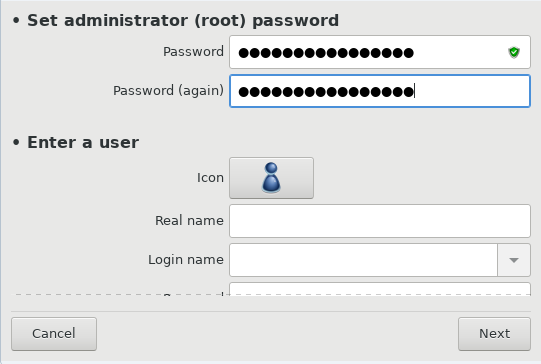
It is advisable for all Mageia installations to set a
superuser (Administrator) password, usually called the
root password in Linux. As you type a password into the
top box a shield will change from red-to-yellow-to-green depending on the
strength of the password. A green shield shows you are using a strong
password. You need to repeat the same password in the box underneath, to
check that the first entry was not mistyped.
Add a User here. A regular user has fewer privileges than the
superuser (root), but enough to use the Internet, office
applications or play games and anything else the average user might use a
computer for.
Ikon
Klicka på den här knappen om du vill ändra på användarens ikon
Fullständigt namn
Klistra in användarens riktiga namn i den här textrutan
Inloggningsnamn
Enter the user login name or let DrakX use a version of the user's real name. The login name is case-sensitive.
Observera
The login entered here should be different to any login currently in use for your
/homedirectory. Some user parameters will be written in the user space, and some can overwrite actual data such as Firefox, Thunderbird or Kmail data...Lösenord
Type in the user password. There is a shield at the end of the text box that indicates the strength of the password. (See also Notera)
Password (again): Retype the user password. DrakX will check that you have not mistyped the password.
Notera
Any users added while installing Mageia, will have a home directory that is both read and write protected (umask=0027)
You can add any extra needed users in the Configuration - Summary step during the install. Choose User management.
Rättigheterna för åtkomst kan också ändras efter installationen.
